DATEV DMS and MCP server: user permissions, metadata, and AI search
2025-12-13
How an MCP server can support DATEV DMS search and AI workflows, and why user permissions, document metadata, and content indexing matter.
Document search with Klardaten: Optional document search makes prepared content from DATEV DMS and Document Storage available to your AI assistant. Explore examples · Activation, supported formats and scope
Many tax firms want to search, summarize, and use their DATEV documents in AI-supported workflows.
The obvious question is often:
Can we simply connect DATEV DMS to a chat interface or AI assistant?
Technically, that is possible. But the real difficulty is not the chat window. It lies in three other areas:
- Users may only see documents they are allowed to access in DATEV.
- DMS metadata and document content are two different things.
- Content has to be extracted and indexed before AI search can work well.
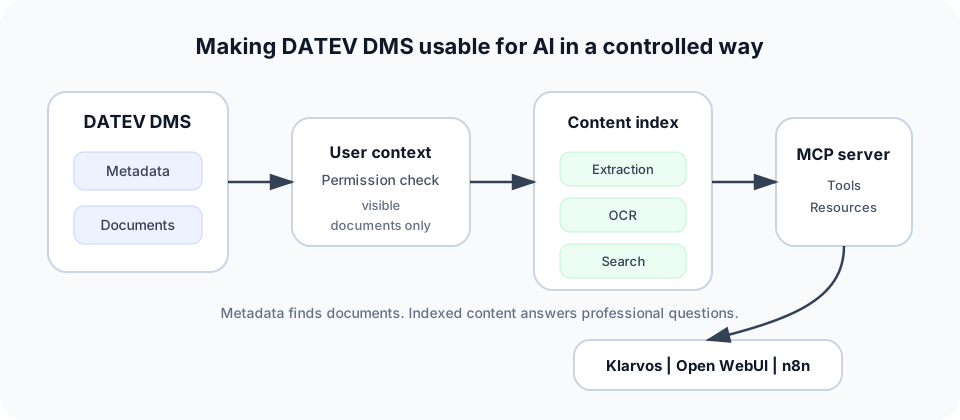
An MCP server can play a useful role here. But only if it is not treated as unrestricted access to all documents. It should be understood as a controlled tool layer over DATEV data, user permissions, and prepared document content.
Klardaten offers MCP in the DATEV context as a structured access layer for existing AI clients and workflow tools such as Langdock, ChatGPT, Claude, Open WebUI, or n8n.
What is an MCP server in the DATEV DMS context?
MCP stands for Model Context Protocol.
Put simply: an MCP server provides structured tools and resources to an AI client. The AI client does not query a database freely and without guardrails. It uses defined tools.
In the DATEV context, such tools might include:
- searching clients
- finding DMS documents for a client
- retrieving document metadata
- searching document content from an index
- assembling relevant documents for a question
- returning sources for an answer
Important: an MCP server in the DATEV DMS context is not a magic universal API for DATEV.
It can only work with data that is available through the underlying DATEV integration. With Klardaten, this may happen through the DATEVconnect Gateway or other Klardaten infrastructure. The gateway is relevant for DATEVconnect-supported areas such as DATEV DMS, accounting, and master data.
The MCP server is therefore not the actual DATEV access. It is the layer that makes this access usable for AI and workflow tools.
Why DATEV DMS is so interesting for AI
In many tax firms, DATEV DMS contains the professional context of day-to-day work.
It may contain, for example:
- tax assessments
- annual financial statements
- e-balance documents
- tax office letters
- appeals
- contracts
- client correspondence
- supporting documents
- internal work papers
- payroll documents
- documents for tax audits
For a tax firm, this is valuable because many questions are not answered in a structured database. They are answered in documents.
Examples:
- "Has this client ever had a tax office query about entertainment expenses?"
- "Where is the latest corporate income tax assessment?"
- "Which documents are missing for the tax assessment review?"
- "Were there any references to Section 7g of the German Income Tax Act?"
- "What does the latest tax office letter say?"
This is where AI can help. Not as an autonomous tax firm employee, but as a search, reading, and preparation layer.
The practical value lies in DMS search, summarization, document classification, and workflow support. These are also typical DMS automation use cases for Klardaten: retrieving metadata, using document files, processing documents, and making DMS content easier to search with AI.
The most important rule: users only see what they are allowed to see in DATEV
This is the core point.
An AI client must not see more than the current user is allowed to see in DATEV.
That sounds obvious, but it is critical from an architecture perspective. A poorly designed DMS chat could otherwise become an accidental permission bypass.
Example:
An employee asks:
"Show me all documents for client Mueller."
The answer may only contain documents that this employee is allowed to see in DATEV. Not all documents that technically exist somewhere in DMS.
This is especially important for:
- sensitive client files
- internal tax firm documents
- payroll documents
- private tax documents
- documents relating to shareholders
- HR topics
- tax audits
- multiple tax firm locations
- tax firm groups
- external service providers or software vendors
The MCP server therefore has to work in the user context. The request has to be associated with a specific user rather than just with a technical system account.
Good architecture means:
- The user is clearly identified.
- The request is executed in the correct user context.
- DATEV permissions are respected.
- The document index is not queried globally.
- Results are filtered with permissions in mind before they are returned.
- Sources remain traceable.
The key sentence for DATEV DMS and AI is:
AI may only work with context the user is authorized to access under the relevant professional and technical permissions.
That is more important than the question of which language model is used.
DMS metadata and document content are two different things
With DATEV DMS, metadata and content have to be treated separately.
Metadata
Metadata describes a document.
Typical metadata includes:
- document title
- client
- document type
- category
- filing date
- creation date
- period
- person responsible
- file reference
- keywords, where available
This can answer questions such as:
- "Which annual financial statements exist for Mueller GmbH?"
- "When was the latest income tax assessment filed?"
- "Is there a document of type appeal?"
- "Which documents were filed this week?"
- "Which tax assessments exist for 2023?"
Document content
Document content is the actual text inside the document.
For example:
- text in a PDF
- content of a scanned letter
- amounts in a tax assessment
- reasoning from the tax office
- clauses in a contract
- details in annual financial statements
- open points in a cover letter
This can answer questions such as:
- "In which tax assessment was the special depreciation rejected?"
- "Which documents mention a hidden profit distribution?"
- "Where does the tax office request evidence for entertainment expenses?"
- "Which documents contain references to Section 7g of the German Income Tax Act?"
- "Which deadlines result from the latest tax office letters?"
These are two different technical tasks.
Metadata access means finding documents.
Content access means understanding documents.
For a good DATEV DMS assistant, you usually need both.
Why document content has to be indexed first
A common misconception is:
If we can retrieve the document file, AI can simply search inside it.
It is not that simple.
A PDF or scan is initially just a file. Before an AI client can search it usefully, the content has to be prepared.
Typical steps:
- Retrieve the document file.
- Extract text.
- Run OCR for scans.
- Clean up the text.
- Identify relevant structure.
- Link the content to client, document ID, and metadata.
- Store the content in a search index.
- Query the index with permissions in mind.
- Attach sources to the answer.
Without indexing, the AI client can only work in a very limited way. It may be able to read individual documents when they are explicitly selected. But it cannot reliably search across many DMS documents.
Example:
"Search all documents that mention a provision for litigation costs."
This does not work well with DMS metadata alone. The content of the documents has to be extracted and indexed first.
Even more importantly: the index must not become an uncontrolled data silo.
If a document in DATEV is only visible to certain users, the index also has to respect this access restriction. Otherwise, the system creates the very problem it was meant to avoid: AI finds content that the user is not supposed to see.
Concrete example requests from tax advisory work
A good MCP server for DATEV DMS scenarios should not be optimized for abstract demo questions. It should support real questions from tax firms.
The following examples show what kind of requests are useful.
1. Metadata-based search
These questions can often be answered through DMS metadata if the metadata is reliably available.
Examples:
"Search all annual financial statements for Mueller GmbH from 2021 to 2023."
"Show me all 2022 income tax assessments for client Schneider."
"Which documents were filed in DMS for Weber KG last week?"
"Find all documents with document type appeal for client Schmidt."
"Is there a 2023 corporate income tax assessment for Becker GmbH?"
"Show me the most recently filed tax office letters for client Hoffmann."
"Which documents exist for the tax audit of Krueger GmbH?"
The main goal here is to find existing documents. The AI client does not necessarily need the content of every document yet.
2. Content-based search after indexing
These questions need the actual document text.
Examples:
"Search for the annual financial statements that mention a provision for litigation costs."
"Find the tax assessment in which the special depreciation was rejected."
"Which documents contain references to a hidden profit distribution?"
"Search for documents in which Section 7g of the German Income Tax Act is mentioned."
"Find the letter in which the tax office requests evidence for entertainment expenses."
"Which documents contain open points on trade tax allocation?"
"Are there tax office letters that mention late payment penalties?"
"Which documents contain references to private car use?"
"Search for documents in which a bonus arrangement is mentioned."
This is where indexing becomes decisive.
The MCP server can then provide the AI client with a search tool that searches not only titles and categories, but prepared document content.
3. Summarization and preparation
This is where AI becomes particularly practical.
Examples:
"Summarize the key points from the latest income tax assessment for client Schneider."
"Compare the latest tax office letter with the filed supporting documents and list missing documents."
"Create a short handover for Mueller GmbH based on the latest annual financial statement documents."
"Which deadlines or action items result from the latest tax office letters?"
"Summarize all documents relating to the appeal against the 2022 corporate income tax assessment."
"Which points should I check before the client meeting with Becker GmbH?"
"Give me a summary of the latest documents for the tax audit."
Here, the system must not only search. It also has to reference sources cleanly. A good answer should make clear which documents support the statement.
Without sources, an AI assistant in tax advisory work quickly becomes risky, because answers can sound plausible while still needing professional verification.
4. Workflow-related questions
These questions connect DMS search with tax firm processes.
Examples:
"Which clients have new tax assessments in DMS, but no documented tax assessment review yet?"
"Show me all newly filed tax office letters from the last seven days, sorted by client."
"Which documents indicate tax office queries?"
"Which client files contain documents relating to a tax audit?"
"Find all documents that are likely to be deadline-critical."
"Which newly filed documents should be reviewed today?"
"Which clients have filed annual financial statement documents, but do not yet have a final evaluation?"
These are not gimmicks. They are real tax firm workflows.
The MCP server is not the entire workflow here. It is the access layer through which an AI client or workflow tool can retrieve relevant DATEV DMS information in a controlled way.
What matters in the architecture
An MCP server for DATEV DMS should not be planned around the language model.
The order should be different:
- Which subject-matter questions should be answered?
- Which documents and metadata are needed for that?
- Which users are allowed to see those documents?
- Which content has to be indexed?
- How are sources returned?
- How do you prevent the index from showing more than DATEV allows?
- Which client uses the tools: Langdock, ChatGPT, Claude, Open WebUI, n8n, or a custom system?
This leads to a few architecture principles.
User context first
The user context is not optional. It is the foundation.
Every request has to be handled in a way that respects the user's permissions. This is especially critical in DMS because documents can be much more sensitive than pure master data.
Treat metadata and content separately
Metadata and content should be separated cleanly at the technical level.
Metadata helps with finding and narrowing down documents. Content helps with understanding and summarizing documents.
Mixing both together quickly leads to poor search results and unclear permission checks.
Plan indexing deliberately
Content indexing is not a by-product. It is a distinct part of the architecture.
Important questions include:
- Which document types are indexed?
- Are scans processed with OCR?
- How up to date does the index have to be?
- Are deleted or changed documents handled correctly?
- Which user permissions are stored or checked in the index?
- How are sources returned?
- Is content stored permanently or only processed in derived form?
Show sources
An AI assistant in a tax firm should not just answer.
It should show which documents the answer is based on.
Example:
"The special depreciation was rejected in the 2022 income tax assessment. Source: 2022 income tax assessment, filed on 14 September 2023."
That is much more valuable than a free-form answer without evidence.
What role does the DATEVconnect Gateway play?
The DATEVconnect Gateway is the access layer for DATEVconnect-based integrations.
For DMS scenarios, it can be relevant when documents, metadata, or DMS-related workflows are reachable via DATEVconnect.
Typical tasks:
- retrieving DMS metadata
- retrieving document files
- bringing DMS data into external workflows
- providing access for software vendors
- making DATEVconnect-supported data available in a controlled way
The gateway is not intended to be a second DMS. It is access infrastructure.
Klardaten is also not intended to be a new data silo. It is a controlled integration layer for making DATEV data usable. In many gateway scenarios, the topic is access and transfer, not permanent storage of DATEV data.
Learn more: DATEVconnect Gateway
What role does Klarvos play?
Klarvos is Klardaten's offering for ready-to-use tax-firm solutions. The tax firm does not build its own chat interface or workflow. It selects a maintained solution and defines the required scope.
Klarvos executes the solution under defined rules and presents a traceable result with sources and execution details for review. Each solution specifies which data may be read or changed and whether approval is required.
For DMS-related tasks, this could be a sourced client briefing that combines relevant DATEV data, documents, and open items for a specific meeting purpose.
Teams that develop their own assistant or workflow instead use the MCP server or DATEVconnect Gateway directly and remain responsible for their solution logic.
Learn more: View Klarvos solutions
What role does the MCP server play?
The MCP server is the structured bridge between an AI client and DATEV access.
Without MCP, every AI client would have to be connected individually to the DATEV integration. That quickly becomes hard to manage.
With MCP, tools can be described cleanly:
search_documentsget_document_metadatasearch_document_contentget_client_contextsummarize_documentlist_recent_tax_office_letters
The value is not only in the technical protocol. The value is that the AI client does not operate blindly, but uses defined tools.
For tax firms, this is decisive because it allows control over:
- which tools are available
- which data may be queried
- which user context the query runs in
- which sources are returned
- which workflows are supported
MCP is therefore not an end in itself. It is a technical pattern for enabling controlled AI access to tax firm data.
Common mistakes with DATEV DMS and AI
Mistake 1: Only thinking about the chat interface
A chat window is quick to build. The difficult part is the data and permissions architecture behind it.
Without good access to DMS, metadata, content, and user permissions, the chat remains a demo.
Mistake 2: Confusing metadata with content
A document title is not the document text.
Anyone who wants to answer content-based questions needs extraction, OCR, and indexing.
Mistake 3: Building a global index
A global index across all DMS documents may sound technically convenient. In a tax firm environment, it is dangerous.
The index has to respect permissions. Otherwise AI can find documents that the user is not allowed to see.
Mistake 4: Not showing sources
Answers without sources have little value in a tax context.
The user has to be able to check which document a statement came from.
Mistake 5: Starting too generically
"We want AI for DATEV" is too vague.
Better:
- "We want to find and summarize tax assessments in DMS."
- "We want to search tax office letters for deadlines."
- "We want to prepare annual financial statement documents for client meetings."
- "We want to find documents with specific tax terms."
Concrete questions lead to better tools.
Conclusion
An MCP server for DATEV DMS is useful when it solves three things cleanly:
- Users only see documents they are allowed to access in DATEV.
- Metadata and document content are treated separately.
- Content is extracted, processed, and indexed with permissions in mind before AI search.
The real value is not in "connecting DATEV to a chat interface." The value is in making tax firm documents usable in a controlled way: for search, summarization, preparation, and workflow support.
For simple DMS questions, metadata is often enough. For substantive content-based questions, indexed content is needed. For production use, user context is required.
This is where a DATEV DMS AI project either becomes practically useful or remains a demo.
Next step
Do you want to use DATEV DMS in your own application or deploy a ready-to-use tax-firm solution?
Klardaten offers two separate paths: MCP and the DATEVconnect Gateway connect your own applications to DATEV. Klarvos handles clearly defined tax-firm tasks and presents the result for review.
Learn more:
FAQ
What is an MCP server in the DATEV DMS context?
An MCP server provides AI clients with structured tools for DATEV-related data and workflows. In the DMS context, these may include tools for document search, metadata retrieval, content indexing, or summarization.
Can an MCP server search DATEV DMS?
Yes, if the underlying DATEV access and permissions allow it. It is important to distinguish between searching DMS metadata and searching document content.
Can users see more documents through AI than they can see in DATEV?
No. This should be prevented technically. A user may only see documents through AI that they are also allowed to access in DATEV.
What is the difference between DMS metadata and document content?
Metadata describes a document, for example title, client, document type, or filing date. Document content is the actual text in the document, such as a tax assessment, tax office letter, or annual financial statement.
Do DATEV documents have to be indexed before AI can use them?
For content-based search: yes. Documents have to be extracted, scans have to be processed with OCR, and the result has to be stored in a search index. The index must respect user permissions.
Does content-based search also work with scanned documents?
Yes, but only with OCR. A scan initially does not contain reliably searchable text. Only after text recognition can the content be searched and summarized usefully.
Can you search for terms such as "Section 7g EStG" or "special depreciation"?
Yes, if the document content has been indexed first. Pure DMS metadata is usually not sufficient for this kind of search.
How do you prevent sensitive documents from appearing in the wrong context?
Through user context, permission checks, and permission-aware queries against the document index. The AI client may only receive results that the current user is allowed to see.
What role does Klarvos play with DATEV DMS and MCP?
Klarvos provides maintained solutions for clearly scoped tax-firm tasks. The firm selects the solution and scope; Klarvos executes it in a controlled environment and presents a traceable result for review. MCP and the DATEVconnect Gateway remain the separate paths for custom AI applications and workflows.
What role does the DATEVconnect Gateway play?
The DATEVconnect Gateway is the access infrastructure for DATEVconnect-based integrations. For DMS scenarios, it can make metadata, document files, and other DATEVconnect-supported data available for external workflows.