Why AI projects in tax firms often fail on data access
2026-04-01
AI in tax firms often fails because controlled access to documents, email, business software, and client data is missing.
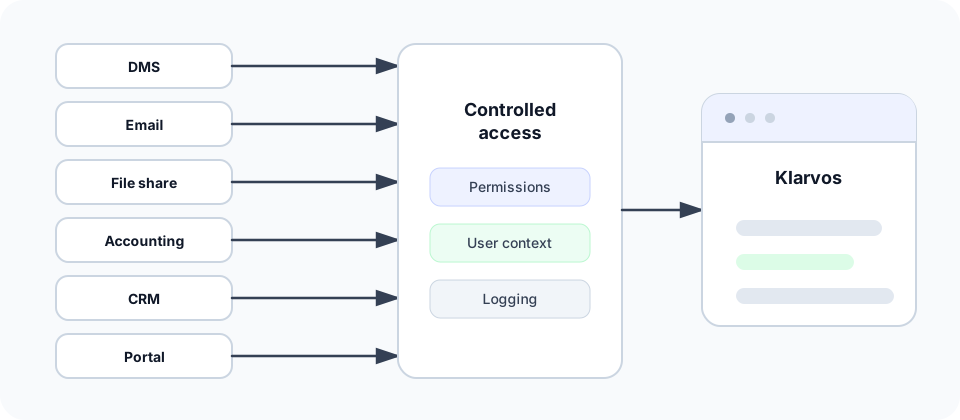
Many tax firms are now testing ChatGPT, Claude, Open WebUI, or their own internal chat solutions. The first results often look useful: drafting text, polishing emails, structuring facts, creating checklists, and writing summaries.
That is useful. But it is not yet a productive AI project for day-to-day firm work.
The breaking point usually comes at the same stage: as soon as AI is supposed to work with real firm data, things get difficult. Not because the language model is too weak, but because it has no clean access to the right data.
The relevant information is distributed across document management, email, business software, file shares, client portals, accounting, CRM, task lists, Excel files, and internal notes. Add to that user permissions, client separation, professional confidentiality, technical legacy systems, and different ways of working across teams.
That is why the key question is not: Which AI model should we use?
The better question is: Which firm data is each user allowed to retrieve, in which context, and under which controls?
AI is not the real product. Controlled data access is the product.
AI without tax firm data remains a better writing tool
An isolated chat window can do a lot. It can make a client email friendlier. It can structure an internal note. It can summarize a long text if an employee manually pastes that text into the chat first.
But that is not enough for real firm work.
The difference becomes clear quickly:
- "Write a friendly follow-up question to a client" works without firm data.
- "Which documents are missing for this client's year-end closing?" only works with access to the right data sources.
- "Summarize the latest correspondence for this case" only works if emails, documents, and case context are available.
- "Which unresolved items came up in the last review?" only works if the AI knows the relevant work context.
Without access to real firm data, AI remains a writing and thinking tool. With controlled access, it can become a work tool.
That is a fundamental difference.
Tax firm data does not live in one place
In many firms, there is no single system where all relevant information comes together cleanly. That would be convenient, but it rarely reflects how firms actually operate.
Typical data sources include:
- document management
- email inboxes
- business software
- file shares
- client portals
- accounting
- CRM
- task and ticket systems
- internal notes
- Excel lists
- archive systems
- scanning and mail intake processes
There is another point: not every source contains the same kind of information.
A document management system may contain filed correspondence. The latest follow-up question may be in an email inbox. A client may have uploaded documents to a portal. Structured values may live in business software. An old working document may sit in a file share. CRM may show who the current client contact is.
For a person, this distribution is often tedious but manageable. Employees know from experience where to search. AI does not know that automatically.
It needs structured access, clear boundaries, and rules for deciding which source is relevant to which question.
The bottleneck is controlled access, not the AI model
Many AI projects start with the wrong assumption: just choose the best model, and the rest will solve itself.
That is convenient, but wrong.
For tax firms, the model is rarely the hardest part. The decisive questions come earlier:
- Which data may the AI read?
- Which client does the request refer to?
- In which user context does the request run?
- Which source does the data come from?
- Is the request about metadata only, or also about content?
- Is data stored permanently or used only for the specific request?
- Which access events are logged?
- Which data may be sent to which model?
- Which information must be deliberately excluded?
These questions are not academic. They determine whether AI can be used productively in a tax firm or only looks good in a demo.
A good language model with poor data access produces poor results. A solid model with clean context, clear permissions, and appropriate tools is often far more valuable in day-to-day work.
Documents are harder than they look
Many AI ideas in tax firms start with documents:
- "Can AI search our documents?"
- "Can it summarize client documents?"
- "Can it identify missing documents?"
- "Can it find old correspondence?"
- "Can it help with internal handovers?"
The idea is right. But document access is technically and organizationally more demanding than it looks in a demo.
First, it is necessary to distinguish between metadata and content.
Metadata is information about a document: name, date, client, category, storage location, creator, status, or case reference. That is valuable, but it is not always enough.
Content is the actual text in the document: the letter, the assessment notice, the attachment, the email, the scan, the note. If AI is supposed to search or summarize based on content, it must be able to read that content. With PDFs, scans, and email attachments, this is not automatically available in a clean form.
Depending on the system environment, content must be extracted, normalized, and indexed. Scans may require OCR. Email threads require sensible handling of signatures, quoted text, and attachments. For versions, it must be clear which document is current.
One rule is non-negotiable: users must not suddenly see documents through AI that they could not access in the source system.
Example requests that only work with clean document access:
- "Find the latest annual financial statements for client Müller."
- "Which documents are missing for the 2024 tax return?"
- "Summarize the correspondence for the appeal."
- "Which documents are available for the tax audit?"
- "Which open questions were raised most recently for this client?"
- "Is there a current assessment for this case?"
- "Which documents were filed for this client engagement in the last 30 days?"
These are not gimmicks. They are search, summarization, and preparation tasks that cost a lot of time in everyday firm work.
But they only work if access, content, client context, and user permissions work together cleanly.
Copy-paste into ChatGPT is not an operating model
Many firms start pragmatically: employees copy text from documents, emails, or business systems into a chat window and ask AI for help.
For experiments, that is understandable. For operations, it is not a sustainable architecture.
Copy-paste has several problems:
- no systematic permission check
- no clean client separation
- no reliable logging
- no repeatability
- no clear data minimization
- no stable context across multiple sources
- no integration into existing workflows
- high risk from manual data selection
- no uniform control by firm IT or firm leadership
At that moment, the employee alone decides which data is copied into which tool. That can work for harmless text. For real client data, internal documents, or sensitive matters, it is not enough.
Copy-paste is a test. It is not a robust tax firm process.
A productive operating model has to work differently: AI does not receive arbitrary data. It uses defined access paths, defined tools, and defined permissions.
User context determines trust
In a tax firm, not every employee may see everything. That is normal.
Access can depend on:
- role
- team
- client
- location
- case
- internal responsibility
- document type
- confidentiality level
AI must not bypass these rules.
That sounds obvious, but many AI demos ignore it. They often use just one technical access path to a data set. That is not enough for real firms.
A useful tax firm AI system has to work in user context. That means the answer depends not only on the question, but also on who is asking and which data that person is allowed to see.
A partner, a staff accountant, a trainee, and an external IT service provider must not automatically receive the same information. Not even if they ask the same question in the same chat.
User context is therefore not a convenience function. It is a prerequisite for trust.
Read-only is the right first step
Many discussions about AI in tax firms jump too quickly to autonomous actions:
- changing data
- closing cases
- sending messages
- posting entries
- making professional decisions
That is the wrong starting point.
The first productive AI step in a tax firm is usually reading, not writing.
Read-only scenarios are valuable and much easier to control:
- finding documents
- summarizing emails
- preparing client context
- identifying unresolved items
- checking document lists
- supporting internal handovers
- preparing follow-up questions
- pre-structuring cases
- combining information from multiple sources
This reduces risk, makes adoption easier, and builds trust with employees, firm IT, and data protection teams.
Read-only does not mean AI is passive or worthless. On the contrary: many of the biggest time losses in tax firms come from searching, checking, summarizing, and switching context.
That is exactly where AI can become useful early.
MCP and structured tool use
One important technical approach for AI projects is structured tool use. MCP, the Model Context Protocol, is one example.
The basic idea: an AI client does not simply receive a large pile of data. Instead, defined tools and resources are available. The AI can use those tools to retrieve specific information.
The Klardaten MCP server also supports selected write actions, such as creating accounting sequences (Buchungsstapel). Write permissions require explicit approval, and write actions are recorded in the audit log.
For tax firms, this is relevant because data access must not be arbitrary.
A structured approach can support, for example:
- search across connected document sources
- retrieval of client-related information
- summarization of selected documents
- checks for missing documents
- preparation of follow-up questions
- support for internal workflows
But MCP is not a cure-all. It does not replace a permissions architecture. It does not automatically solve data quality, hosting, logging, or professional confidentiality.
MCP can help structure AI access more cleanly than loose copy-paste processes. But the actual work remains: connecting data sources, respecting permissions, preserving user context, and defining clear boundaries.
What a robust AI architecture in a tax firm must provide
A serious AI architecture for tax firms needs more than a good model and a polished chat interface.
It needs an architecture that fits day-to-day work in the firm.
Important requirements include:
- connecting data sources cleanly
- establishing client context
- respecting user permissions
- distinguishing document metadata from content
- extracting and indexing content where needed
- starting with read-only access
- logging access
- minimizing data
- involving firm IT
- retaining professional control
- defining clear limits for external models
- accounting for existing workflows
- surfacing failure cases
- clarifying ownership for operations and support
These points are less spectacular than an AI demo. But they are the difference between a toy and productive use.
A tax firm does not need AI that sounds impressive. It needs a system that reliably handles real work contexts.
Useful entry scenarios
The best entry point is not the largest process. It is a clearly bounded read-only use case with obvious value.
Good starting points include:
1. Document search across multiple sources
AI helps find relevant documents for a client or case. Not only by file name, but also by content, period, category, or question.
Example:
"Which documents were filed for client X in the last quarter and relate to the current review?"
2. Summarizing client context
Before a phone call or internal handover, AI can prepare relevant information.
Example:
"Summarize the latest unresolved items, follow-up questions, and documents for this client."
3. Preparing follow-up questions
AI does not create a final message without professional review, but it can prepare a structured follow-up question.
Example:
"Draft a short list of missing documents based on the available documents and notes."
4. Completeness checks
AI can help compare available documents with a checklist or expected process status.
Example:
"Which documents appear to be missing for this case?"
5. Internal handovers
When an employee is ill, leaves the firm, or hands over a client engagement, context is often scattered. AI can help make that context readable.
Example:
"Create an internal handover for this client engagement based on the latest documents, notes, and open tasks."
These scenarios have one thing in common: they do not change primary data. They help with finding, understanding, and preparing.
That is exactly why they are suitable starting points.
Context: where Klarvos fits
The requirements in this article also explain why Klarvos is not a general chat or workflow platform. Klarvos provides maintained solutions for clearly scoped tax-firm tasks.
The tax firm selects a solution, client, and scope. Klarvos executes the task under defined rules and presents the result with sources and execution details for review.
The relevant point is not text generation itself, but a reliably defined result based on the right data in the right user context.
Teams that instead develop their own AI assistant or workflow can connect it to DATEV through the Klardaten MCP server or DATEVconnect Gateway. In that case, the developer or tax firm remains responsible for the solution logic.
For both paths, the real difficulty is providing only the context required for the specific task and permitted for the current user.
Conclusion: solve data access first, then talk about models
AI projects in tax firms rarely fail because the language model cannot write sentences. They fail because of distributed data, missing user context, unclear permissions, and weak operating models.
Anyone who wants to use AI productively should therefore not start with the model question.
The better order is:
- Which tax firm processes should be supported?
- Which data sources are necessary for that?
- Which users may see which data?
- Which content must be indexed or structured?
- Which access paths remain read-only?
- Which actions require professional control?
- Which AI model fits that architecture?
The model matters. But it is not the core.
The core is controlled data access.
Only when this is solved cleanly does AI become more than a useful chat window in everyday firm work.
FAQ
Why is ChatGPT alone not enough for tax firms?
ChatGPT can write, explain, and structure text. But for real firm work, it lacks access to client context, documents, email, business software, and internal information unless it is integrated. Without that data, it remains an isolated tool.
What does data access mean for AI in a tax firm?
Data access means that AI can access relevant firm data in a controlled way. This includes documents, email, cases, tasks, accounting data, CRM information, and other sources. The key point is that this access is authorized, traceable, and client-specific.
Which data sources are relevant for tax firm AI?
Typical sources include document management, email, business software, file shares, client portals, accounting, CRM, task lists, internal notes, Excel files, and archive systems. Which sources matter depends on the specific use case.
Why is document search with AI technically difficult?
Documents are not just file names and metadata. For content-based search, text must be extracted from PDFs, scans, emails, and attachments, and often indexed. Permissions, versions, client context, and document types also have to be handled correctly.
What is the difference between document metadata and document content?
Metadata describes a document, for example title, date, category, client, or storage location. Content is the actual text in the document. Metadata is often enough for simple filters. For summaries and content-based search, AI needs access to content.
Why is user context important for tax firm AI?
Not every employee may see the same data. AI must not expand access rights. A request therefore has to be executed in the context of the individual user. The answer must depend on which information that user is actually allowed to see.
Should AI in tax firms start with read-only access?
Yes, in most cases read-only access is the most sensible starting point. AI can search, summarize, check, and prepare without changing data. That reduces risk and makes adoption easier.
What is MCP in the context of tax firm AI?
MCP stands for Model Context Protocol. It describes an approach where AI clients can use structured tools and data sources. For tax firms, this can help make access more controlled than manual copy-paste. MCP does not replace a permissions architecture.
Is copy-paste into ChatGPT useful for firm data?
For initial tests, copy-paste can be pragmatic. For productive tax firm processes, it is not a robust model. It lacks systematic permission checks, logging, client context, data minimization, and integration into existing workflows.
How can Klarvos help with AI projects in tax firms?
Klarvos provides maintained solutions for recurring tax-firm tasks. The firm selects the solution and scope; Klarvos executes it under defined rules and presents a traceable result for review. MCP and the DATEVconnect Gateway are available separately for custom AI applications. Learn more about Klarvos.